 EMV Stack
Case · Tool integration
Integrating Mastercard's Test Environment Interface (TEI)
Mastercard's Test Environment Interface (TEI) is an extension proposed by Mastercard, and by its partners who build certification tools, to automate the test plan used to validate contactless EMV Level 2 systems. Two levels of documentation exist:
- tool documents, released by the tool vendors;
- the protocol document, released by Mastercard.
This case gives additional information to help you understand, develop and integrate the TEI.
A shift of paradigm
The TEI does not test a Mastercard contactless EMV Level 2 implementation the way a manual testing tool would. A manual approach triggers transactions and analyses their outcomes from outside the payment domain. The TEI sits inside it.
| Manual testing | TEI | |
|---|---|---|
| Triggering a test | The Mastercard test plan defines "Purchase Amount" values, not Amount, Authorised (9F02) values. | The trigger signal carries Amount, Authorised (9F02) values, not "Purchase Amount" values. |
| Signals | Nothing prevents the test environment (the SDK) from showing signals outside the kernel's scope, such as "Present card", "Try again", "Approved" or "Declined". | The TEI validates the signals raised by the EMV Level 2 system. Any other source of signals must be muted. |
| What the product is | The SDK is not part of the product. The System Under Test (SUT) is what is certified. | The product merges the TEI Server and the SUT. |
Architecture
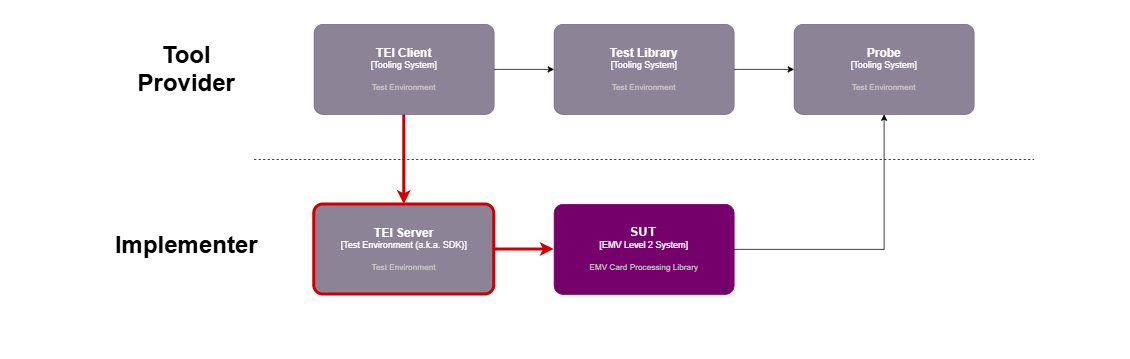
The model below maps the names you will find in the tool vendors' and Mastercard's documentation to the components you actually have to build or run.
| What may be called… | …is actually | Description |
|---|---|---|
| Accredited Tool | Test engine + Mastercard test library + probe | The core of the compliance tooling. It encapsulates an accredited Mastercard library implementing Mastercard's test plan, and comes with a probe that couples the SUT and the tool through APDU exchanges. |
| Test Environment Interface | TEI Client | The extension of the Accredited Tool that interfaces the TEI Server with the test engine. |
| Mastercard product | TEI Server + EMV Level 2 system | The development scope for an EMV Level 2 implementer: integrating the TEI messages, implementing the TEI logic and integrating the SUT. |
TEI Server functional requirements
For most implementers, the TEI logic must fit into a wider scope that lets testers validate the SUT beyond Mastercard. The challenge is to reuse the existing API used to configure, trigger and fetch the outcomes of any contactless EMV Level 2 kernel for Mastercard.
- Integrate the TEI Client protocol into the TEI Server. The minimum set of messages is listed below.
- Configure the SUT.
- Trigger a transaction.
- Collect the transaction outcomes and relay them to the TEI Client.
- Optionally manage DEK and DET messages, depending on the ICS.
| Message | Direction (seen from the TEI Server) | Description |
|---|---|---|
ACT | Inbound | Transaction related data required to trigger a transaction on the SUT. |
ACT_ACK | Outbound | Must be sent by the TEI Server to the TEI Client when it receives ACT. |
CONFIG | Inbound | Configuration reference (its name) required to perform a test. Keys and revocation data are not referenced: they must be resident on the SUT or pushed to it. |
CONFIG_ACK | Outbound | Must be sent by the TEI Server to the TEI Client when it receives CONFIG. |
DEK | Outbound | Only if data exchange and data storage (DE/DS) are supported. |
DET | Inbound | Only if DE/DS are supported. |
MSG | Outbound* | User Interface Request Data raised exclusively by the Mastercard EMV Level 2 kernel, in three cases: CARD READ SUCCESSFULLY (built at S9.27), SEE PHONE (built at S910.73) and DECLINED (built at S910.73). |
OUT | Outbound | Contains the Outcome Parameter Set, Data Record, Discretionary Data, the OUT User Interface Request Data and the kernel ID. |
TEST_INFO | Inbound | Always sent. It does not need to be interpreted to get the data required to perform a transaction. |
TEST_INFO_ACK | Outbound | Must be sent by the TEI Server to the TEI Client when it receives TEST_INFO. |
* The mag-stripe path is not covered here because it is about to be deprecated.
Sequence of a test
| Step | Description |
|---|---|
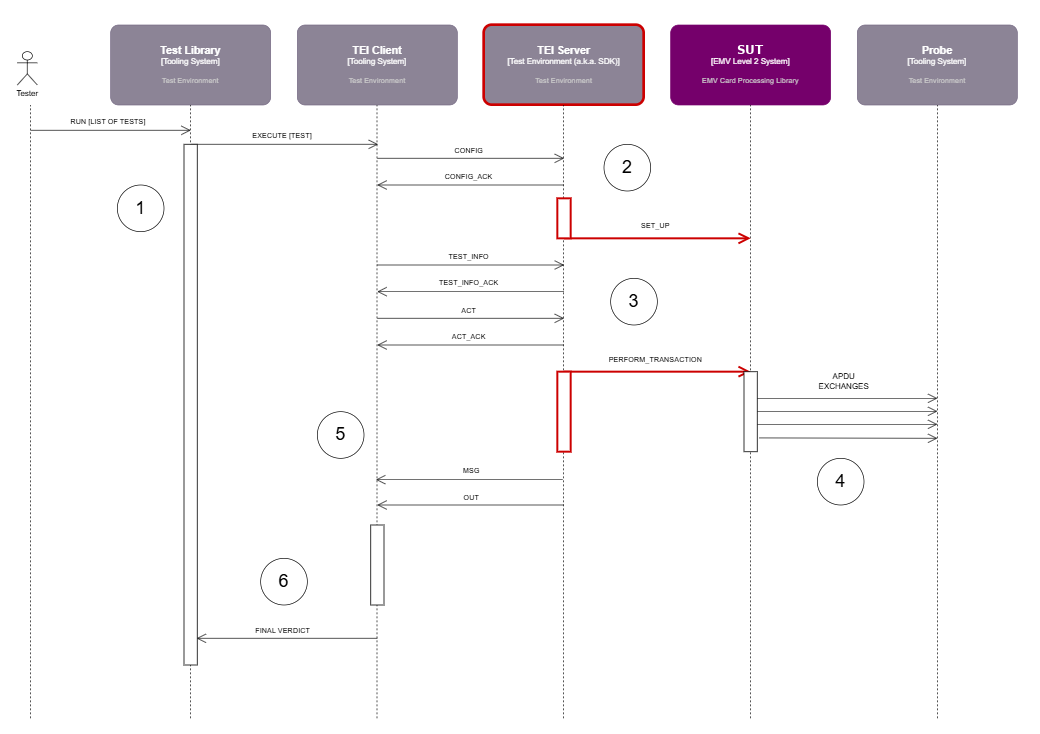
| Pre-conditions | The tooling system and the test environment are connected to the SUT. |
| 1 | The tester selects one or more tests in the tool library's user interface and starts the test run. |
| 2 | The TEI Client gets the list of tests to run and sends the TEI Server a CONFIG message for the next test. The TEI Server either passes the configuration reference (its name) to the SUT, or sends the configuration data itself, based on the CONFIG.value JSON field. This step may also require cleaning up and setting other information such as CA keys and revocation data, depending on where the SUT keeps its configurations. The CONFIG JSON is optional: to save time, the TEI Client may not send it when two consecutive tests use the same configuration. |
| 3 | Right after the configuration, the TEI Client sends a TEST_INFO message, which the TEI Server does not need. The next important message is ACT, which contains all the Transaction Related Data the SUT needs to perform a transaction. Depending on the SUT, this step may require converting 9F02 into a purchase amount. The TEI Server then triggers the transaction on the SUT, in whatever way the implementation requires. |
| 4 | The SUT performs the transaction and exchanges APDUs with the tool's probe. At the end, the SUT sends all the signals collected during card processing. These signals are used to validate the test, while APDU contents are validated throughout the flow. |
| 5 | The TEI Server receives the signals produced by the transaction and relays them in the order the SUT raised them. A test can produce several MSG and several OUT messages, and can involve several transactions. |
| 6 | The TEI Client processes the signals, gives the tool library a final verdict and updates the test status. It then moves on to the next test, if any. |
| Post-conditions | The SUT is ready for the next transaction and the tool has updated the test status. |
Pitfalls we ran into
- User Interface Request Data: do not pad UIRD values with
00bytes up to 22 bytes. - JSON framing: do not add a newline (
\n) at the end of the JSON messages sent to the TEI Client. - Deployment: the TEI Server may run on the same IP node as the TEI Client or on a different one.
- FIME EVAL+: do not use Chrome's incognito mode with it.
- END APPLICATION with restart at Start B: these cases do not make the TEI Client send two
ACTsignals. Add a short sleep between theMSG/OUTbatches sent to the TEI Client; there is no need to sleep in the SUT. - PC/SC readers: if you use a PC/SC reader, mute the switch-off antenna command.
- Amounts: remember that
ACTprovides Amount, Authorised (9F02) values, not purchase amounts.
Lessons
- Mute every user interface signal that does not come from the EMV Level 2 kernel, or the TEI will see signals it does not expect.
- Relay
MSGandOUTmessages in the exact order the kernel raised them; a test may produce several of each. - Do not depend on
CONFIGdata being sent before every test, and make sure CA keys and revocation data are already on the SUT. - Acknowledge
ACT,CONFIGandTEST_INFOeven when you do not need their content. - Design the TEI Server on top of the same API you use to configure and run the kernel, so the TEI is one more client rather than a separate code path.